The scene is a modern parenting paradox: you drop your child off at school, where a strict "phones away in lockers" policy is enforced to minimize distraction and maximize learning. A few hours later, they return home, and the same device transforms from a forbidden object into a central part of their social life, homework research, and entertainment. This jarring shift creates a confusing double standard for children, putting parents in the difficult position of enforcing rules that seem to contradict the school's environment.
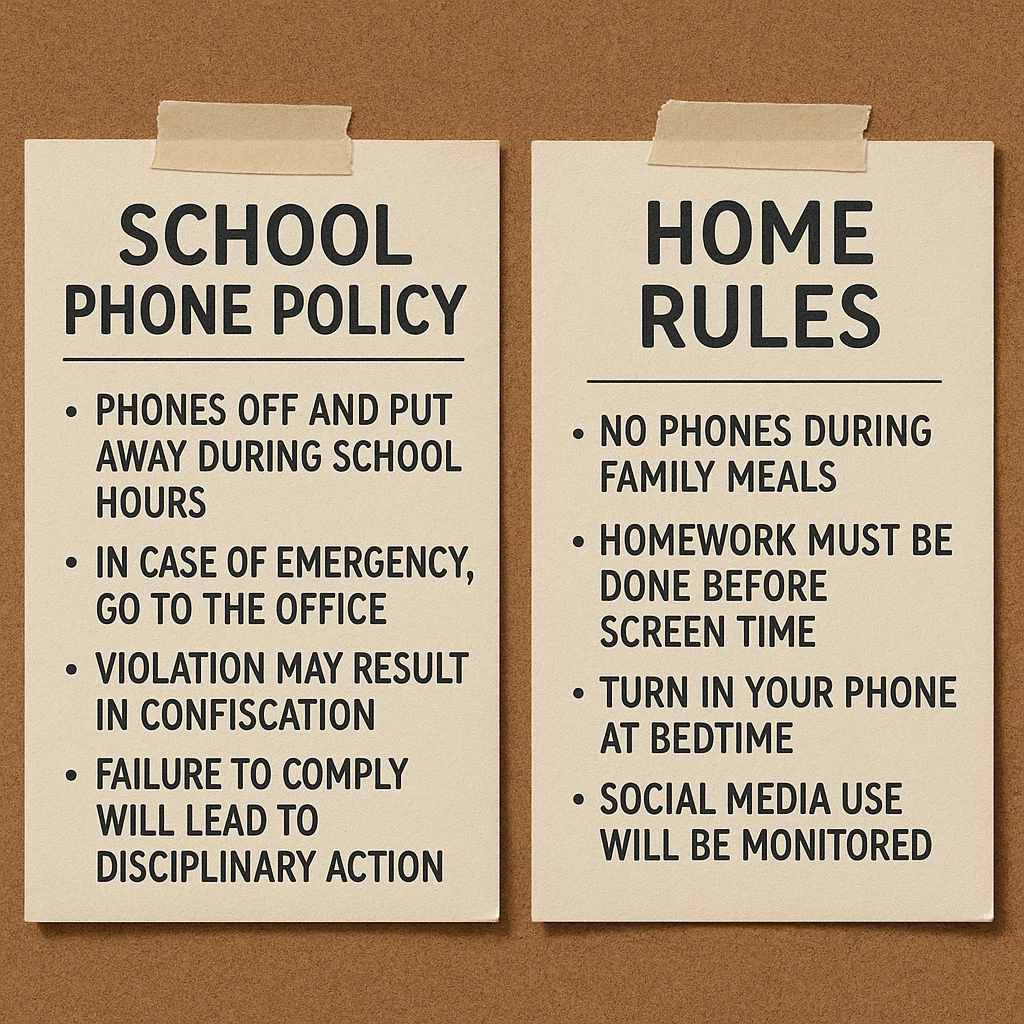
Having advised schools and families on digital citizenship for ten years, I've seen firsthand how this disconnect undermines everyone's efforts. Students get mixed messages, teachers fight an uphill battle against phone addiction, and parents feel unsupported. But there is a powerful solution: alignment. By consciously bridging the gap between the school phone policy and home rules, you can create a consistent, understandable framework for your child that promotes responsibility, improves focus, and enhances safety. This guide will show you how to build that essential bridge.
Understanding the "Why": The Logic Behind School Phone Policies
To effectively align your home rules, it's crucial to first understand the reasoning behind most school policies. They are not arbitrary punishments; they are based on clear educational and social goals.
Minimizing Distraction: A study from the London School of Economics found that schools with phone bans saw a measurable improvement in student test scores, with the most significant gains for struggling students. The constant pull of notifications and the temptation to scroll disrupt the deep focus required for learning.
Promoting Social Interaction: School is a primary environment for developing social skills. Phones during lunch or breaks can inhibit face-to-face conversation, empathy, and the ability to navigate unstructured social time.
Preventing Cyberbullying: By limiting phone access during the school day, schools can reduce the immediate, in-the-moment cyberbullying that can escalate quickly and poison the school community.
Ensuring Academic Integrity: Phones make it easy to look up answers, photograph tests, or message classmates during assessments.
When you understand these goals, you can frame your home rules not as an extension of school's authority, but as a complementary effort to achieve the same outcomes: focus, real-world connection, and integrity.
The Home Component: Establishing Your Family Digital Values
Your home is not a school, and your rules shouldn't be an exact replica. Instead, they should be an extension of your family's core values, designed to manage the unique challenges of home life. The key is consistency in principle, not necessarily in practice.
Your home rules should address:
Recharging and Downtime: Just as the school day needs to be phone-free for focus, the home needs phone-free times for connection and rest (e.g., during meals and before bed).
Balanced Leisure: While school bans phones to prioritize academics, home rules can encourage a balance between screen-based and offline activities.
Digital Citizenship: The school policy often focuses on preventing negative behavior. Your home is the ideal place to teach positive digital behavior, like kindness, critical thinking, and privacy protection.
The Bridge Strategy: Creating a Seamless Transition
The most challenging part of the day can be the transition from school to home. Without a plan, the first thing a child often does is dive into the digital world they've been missing. Here’s how to build a bridge that supports a healthier transition.
1. The After-School "Digital Detox" Hour:
Establish the first 60 minutes after school as a screen-free buffer zone. This serves a similar function to the school's in-class policy: it allows the brain to shift gears. During this time, encourage:
A healthy snack and conversation about their day.
Physical activity outdoors.
Getting a start on homework that doesn't require a screen.
This break helps "reset" their brain from the passive consumption of a phone to the active engagement needed for homework and family interaction.
2. Aligning on Homework and Phone Use:
One of the biggest conflicts at home revolves around homework. Adopt a modified version of the school policy. If the school requires phones to be away and out of sight during class, the same rule should apply during dedicated homework time at home. This eliminates the temptation to quickly check a notification and fall down a 30-minute social media rabbit hole.
How Parental Control Apps Enforce Consistency
While communication is the foundation, technology can be the tool that ensures your school phone policy and home rules are followed consistently, even when you're not physically present to enforce them. These apps act as an impartial, always-on reminder of the boundaries you've set together.
mSpy: For Comprehensive Schedule Enforcement
mSpy is a powerful, all-in-one monitoring solution that allows you to remotely manage your child's device according to the schedules you set, mirroring the school-day restrictions.

Key Features for Consistency:
App Blocking & Usage Reports: You can see which apps are being used and for how long. Crucially, you can remotely block access to social media, games, and other distracting apps during school hours and homework time, directly supporting the school's mission.
Screen Time Scheduling: Set strict time limits for overall device use or for specific app categories, automating your home rules for balanced leisure.
Keylogger: This feature records keystrokes, which can provide insight into what your child is working on or searching for during study periods.
mSpy provides the high level of control needed to create a truly phone-free focus environment, both at school and at home.
Scannero.io: For Location-Based Peace of Mind
Scannero.io specializes in location-based services, which can be invaluable for verifying your child is adhering to the physical boundaries tied to the school phone policy and home rules.
Key Features for Consistency:
Location Tracking & Geofencing: Set up a virtual boundary around the school. You can receive an automatic notification when your child's phone arrives at and leaves school, confirming they are following the policy of bringing it to campus. You can also set geofences around your home or library.
SMS Tracking: Read incoming and outgoing text messages, which can be useful for understanding if late-night texting is disrupting sleep, contradicting your home rules.
Scannero.io is an excellent tool for parents whose primary concern is verifying location and ensuring the phone is where it's supposed to be.
Moniterro: For Balanced Monitoring and Awareness
Moniterro offers a robust set of monitoring tools that provide a clear overview of your child's digital habits, helping you ensure their phone use aligns with family expectations after school.
Key Features for Consistency:
Social Media & Message Tracking: Monitor conversations across various platforms to ensure online interactions are positive and not spilling over into homework time.
Web History & Bookmark Monitoring: See if your child is focusing on research for a project or getting distracted by entertainment sites during study hours.
Remote Device Control: If a rule is broken, you can block apps or lock the device remotely from your control panel, providing an immediate consequence that reinforces the boundaries.
Moniterro helps parents maintain a balanced awareness of their child's digital life, ensuring home rules are respected.
The Power of a Unified Family-School Agreement
Take alignment a step further by creating a simple "Family-School Digital Compact." This is a one-page document that outlines:
The School's Phone Policy: A clear summary of the rules.
Our Home Rules: How you support the school's goals at home.
Our Shared Values: The common principles, like focus, respect, and safety, that both sets of rules are based on.
Review this compact with your child at the start of the school year. It transforms separate sets of rules into a single, coherent philosophy for responsible phone use.
Conclusion
Navigating the world of school phone policy and home rules doesn't have to be a battle on two fronts. By understanding the school's objectives, establishing complementary home values, and using technology to enforce consistency, you send your child a powerful, unified message. This clarity reduces their cognitive load, minimizes arguments, and creates an environment where they can thrive both academically and socially.
You and your child's school are on the same team. When you work together to provide a consistent framework, you give your child the best possible chance to develop a healthy, balanced relationship with technology.
Frequently Asked Questions (FAQs)
1. What if I disagree with my child's school phone policy?
Even if you disagree with the method, try to find common ground on the goal (e.g., reducing distraction). You can voice your concerns to the administration, but at home, frame the policy as a rule to be respected, like any other school rule. Use it as a teaching moment about following community guidelines, even when we don't fully agree with them.
2. My child says they need their phone for schoolwork. How do we handle this?
This is a valid point. The solution is nuance. Work with your child and their teachers to distinguish between "tool" use and "toy" use. If they need a specific app for an assignment, that's a tool. Social media is a toy. Your home rules and parental controls can be adjusted to allow educational apps while blocking distractions during homework time.
3. Should I check my child's phone even if the school hasn't reported a problem?
Yes, proactive monitoring is a key part of parenting, not a reaction to problems. It's similar to checking in on their academic progress before report cards come out. Transparently checking their phone helps you guide them, catch small issues before they become big ones, and ensures they are adhering to the safety and respect guidelines you've set together, regardless of the school's awareness.


