The image is a familiar one in homes across the country: a young child, not yet ten years old, deftly navigating a tablet to watch their favorite cartoon or play an educational game. For primary school children, the digital world is as natural as the physical one. It’s a place of wonder, learning, and connection. But as parents, we see the other side—the potential for exposure to inappropriate content, contact with strangers, and the simple risk of too much screen time.
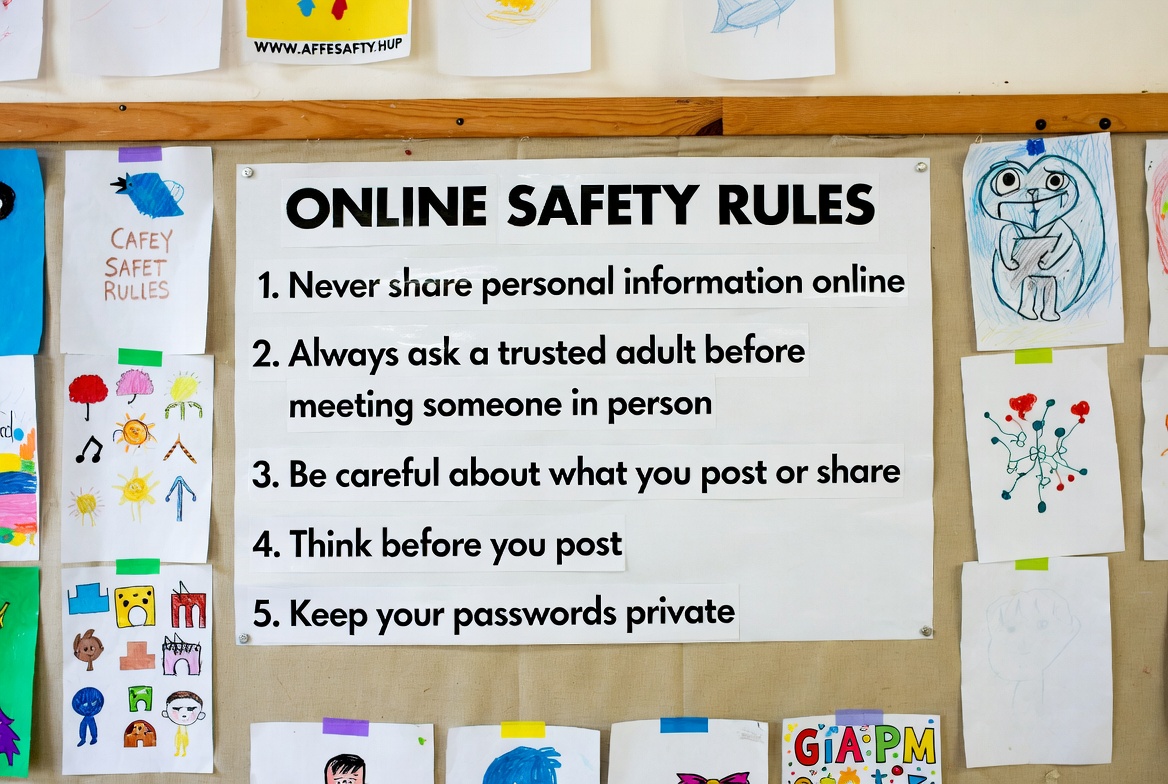
Having worked with families for over a decade, I know that anxiety well. The key isn't to ban the internet, but to equip our children with the knowledge and boundaries they need to explore it safely. This guide will provide you with clear, actionable online safety rules for primary school kids and introduce you to the tools that can help you enforce them, giving you peace of mind.
Laying the Foundation: The Core Principles of Digital Parenting
Before we get into specific rules, it's important to understand the mindset. For primary-aged children, online safety is an extension of offline safety. The same principles of "stranger danger," kindness, and knowing when to ask for help apply directly to the digital world. Your role is not to be a watchful guard every second, but to be a trusted guide. The goal is to build a foundation of good habits and open communication that will protect them long after they've outgrown parental controls.
Rule #1: Keep Personal Information Private (The "No Sharing" Rule)
This is the cornerstone of internet safety for young children. They need to understand that the internet is a public space, and some information is for family only.
How to Teach It:
Use simple analogies: "Just like we don't shout our home address in the park, we don't type it into games or websites."
Create a list of "Never Share" details: full name, home address, school name, phone number, and passwords (except with parents).
Practice with them: When a game asks for a username, help them create one that doesn't reveal their real identity (e.g., "DragonLover42" instead of "EmilyJones").
Rule #2: The "Digital Footprint" is Permanent (Think Before You Post)
Children this age often don't grasp that what they put online can be seen, saved, and shared by others. Teaching them about their digital footprint is crucial.
How to Teach It:
Use the "Grandma Test": Encourage them to ask, "Would Grandma be happy to see this photo or read this message?" If the answer is no, they shouldn't share it.
Explain that once something is online, it's like trying to get toothpaste back into the tube—nearly impossible. Even "disappearing" messages can be screenshot.
Rule #3: Communicate Openly About Online Interactions (The "Tell Me Everything" Rule)
The most powerful protective tool you have is your relationship with your child. They must feel safe coming to you with anything they see or experience online that makes them feel confused, scared, or uncomfortable.
How to Teach It:
Promise them they will never be in trouble for telling you about something they saw online. Your reaction should be calm and supportive, not angry.
Make it a habit to ask, "What was the coolest thing you saw online today?" and "Did anything make you feel weird or funny?" This normalizes the conversation.
Role-play what they should do if a stranger contacts them or if they see something scary. A simple script like, "Close the screen and come find me immediately," gives them a clear action plan.
Rule #4: Cultivate a Culture of Kindness (No Cyberbullying)
Bullying doesn't just happen on the playground. Teach your child that the rules of kindness and respect apply to texting, gaming chat, and comments on videos.
How to Teach It:
Be explicit: "If you wouldn't say it to someone's face, don't type it."
Explain that emojis and text can be misinterpreted, so it's important to be extra clear and kind.
Teach them to be an "upstander." If they see someone else being bullied online, they should not join in. Instead, they should report it to a trusted adult.
Rule #5: Establish Clear Screen Time and Location Boundaries
Healthy habits are formed early. Having clear, consistent rules about when and where devices can be used prevents overuse and protects sleep and family time.
How to Teach It:
Create Phone-Free Zones: Make bedrooms, and especially beds, screen-free. Charge devices overnight in a common family area, like the kitchen.
Set Time Limits: Use timers or parental controls to enforce daily limits. Encourage a balance with offline activities like reading and outdoor play.
Public Use Only: For primary school kids, a good rule is that devices are only used in common family areas like the living room, not alone in their bedroom.
Using Technology to Support Your Rules: An Overview of Parental Control Apps
While rules and communication are your first line of defense, parental control apps provide a vital safety net. They help you consistently enforce boundaries and give you insight into your child's digital activity. Here are three options that can support your online safety rules for primary school kids:
mSpy: For Comprehensive Monitoring and Peace of Mind
mSpy is a powerful application for parents who want a detailed view of their child's digital interactions.

It allows you to monitor social media messages on platforms like Instagram and WhatsApp, view text messages and call logs, and track browsing history. Its key strength is providing a window into your child's online social world, helping you identify potential risks from strangers or peers.
BUY NOW
Scannero.io: Simple and Effective Location Tracking
If your primary concern is your child's physical whereabouts, Scannero.io offers a straightforward solution. It specializes in real-time location tracking and geofencing.
You can set up safe zones (like home or school) and receive instant alerts if your child arrives or leaves these areas. Its simplicity makes it an excellent choice for parents who need reliable location data without complex features.
TRY NOW
Moniterro: Balanced Monitoring for the Modern Family
Moniterro provides a balanced set of features that support various safety needs.
It offers insights into social media activity, text messages, and web browsing, while also including location tracking and screen time management tools. It’s a robust all-in-one solution for parents who want a wide range of oversight capabilities in a single, user-friendly application.
BUY NOW
Conclusion
Implementing these online safety rules for primary school kids is not a one-time event, but an ongoing process of guidance and support. By starting early, focusing on open communication, and using tools like parental controls as a supportive net, you are not just protecting your child—you are empowering them to become smart, respectful, and resilient digital citizens.
The digital world is an incredible resource for our children. Let's work together to ensure their journey through it is a safe and positive one. Start the conversation today, and take a proactive step towards your family's digital well-being.
Frequently Asked Questions (FAQs)
1. At what age should I start talking to my child about online safety?
Start as soon as they begin using a device that connects to the internet, even if it's just for games. For a 5 or 6-year-old, this can be simple rules like, "Always ask me before clicking on a new video." The conversations should evolve in complexity as they grow.
2. Should I ban social media and online games entirely?
An outright ban can often make the forbidden fruit more appealing and doesn't teach responsible use. A better approach is to use child-friendly alternatives (like YouTube Kids) with restricted modes and to closely supervise their use of age-appropriate games, using these as teaching moments for the safety rules.
3. How can I check my child's online activity without violating their trust?
Be transparent. Tell them that, just as you look both ways before they cross the street, you will check their online activity to help keep them safe. Frame it as a part of your job as a parent, not a lack of trust. For older primary kids, you can agree on specific things you will check, turning it into a shared understanding rather than a secretive action.


