I’ll never forget the panicked call from a mother who discovered her 12-year-old daughter was communicating with a stranger through TikTok Duets. In my ten years of working in online child safety, I’ve seen how quickly a seemingly harmless app can become a source of risk. TikTok’s vibrant, fast-paced environment is incredibly appealing to young users, but its very design can expose them to inappropriate content, privacy issues, and unwanted contact.
The good news is that you are not powerless. TikTok has a suite of powerful safety features—if you know where to find them. This comprehensive guide to safe TikTok settings for kids will walk you through every crucial control, from making an account private to using advanced parental monitoring. By the end of this article, you will be equipped to create a much safer digital playground for your child.
Why You Can't Rely on Default Settings
TikTok is designed for engagement, not necessarily for child safety. Out of the box, many privacy settings are not set to their most secure options. A study by the nonprofit Common Sense Media found that a significant portion of teens' social media use is completely unsupervised, leaving them vulnerable to the platform's inherent risks.
The goal of this guide to safe TikTok settings for kids is to shift the balance of power from the algorithm back to you, the parent. This isn't about mistrust; it's about applying the same proactive safety measures you use in the physical world to your child's digital life. Taking these steps is a fundamental act of modern parenting.
The Foundational Step: Setting Up a Private Account
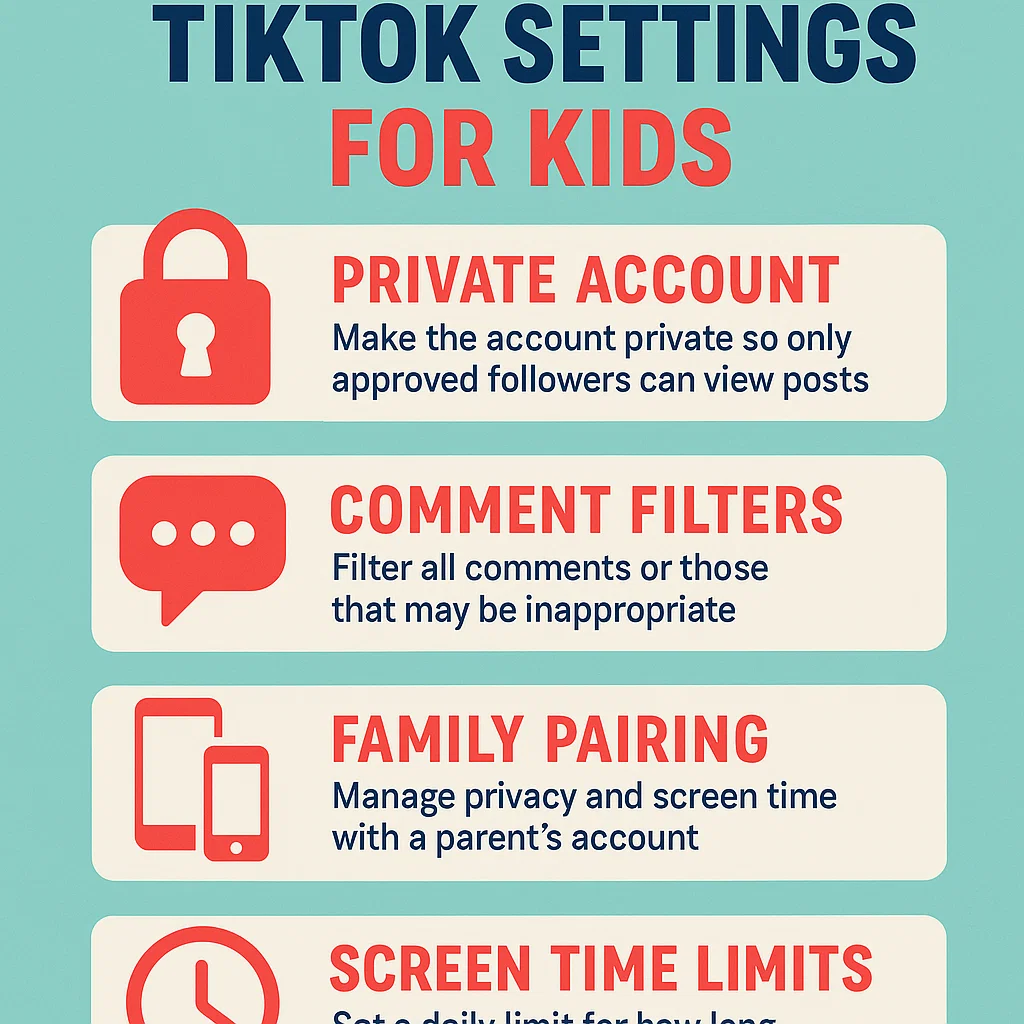
The single most important action you can take is to ensure your child's account is set to private. This is the cornerstone of a safe TikTok experience.
Here’s how to do it:
Go to your child’s profile page and tap the three-line menu icon in the top-right corner.
Select Settings and Privacy.
Tap Privacy.
Toggle the switch for Private account to the on position.
Why this matters: A private account means that only people your child approves as followers can see their videos, their liked videos, and their following list. It prevents strangers from viewing their content or downloading it without permission. This is the essential first step in any guide to safe TikTok settings for kids.
Mastering TikTok's Family Pairing Feature
TikTok’s Family Pairing is a powerful tool that allows you to link your account to your child’s and manage their safety settings directly from your own phone. It’s the closest thing to a built-in parental control system.
How to Set Up Family Pairing:
You and your child both need the TikTok app.
On your phone, go to your profile, tap the menu (☰), and select Settings and Privacy.
Tap Family Pairing and select Parent.
Follow the on-screen instructions to scan a QR code.
On your child's phone, they need to go to Family Pairing in their settings and select Teen, then scan the QR code on your screen.
Once linked, you can control the following from your own device:
Screen Time Management: Set a daily time limit for how long your teen can use TikTok (40, 60, 90, or 120 minutes).
Restricted Mode: This feature helps filter out content that may be inappropriate. It's not perfect, but it's a critical filter.
Direct Messages: You can restrict who can send messages to your teen or turn off DMs entirely. For users under 16, DM functionality is disabled by default, but it's crucial to check this setting.
Search: For younger teens, you can disable the search function. This limits them to seeing content only from accounts they already follow, creating a more controlled "walled garden."
Critical Privacy Settings You Must Check Now
Beyond Family Pairing, several other privacy settings demand your attention. Work through this checklist with your child's account.
1. Disable Video Downloads:
Go to Settings and Privacy > Privacy > Downloads.
Ensure this setting is turned OFF. This prevents other users from downloading your child's videos to their own devices, protecting their image and content.
2. Control Comments and Tags:
Go to Settings and Privacy > Privacy > Comments.
You can set this to "Friends" or turn them off completely.
In the same section, review "Who can tag you" and "Who can duet with you" settings, restricting them to "Friends" or "No One."
3. Manage Story Views (if they use TikTok Stories):
If your child uses the "Story" feature, ensure it is set to "Friends" only in the Privacy settings.
4. Limit "Suggested Your Account":
Go to Settings and Privacy > Privacy > Suggest your account to others.
Turn OFF both "Suggest your account to others" and "Sync your contacts." This reduces their digital footprint and makes it harder for strangers to find them.
The Limits of TikTok's Built-In Controls
While Family Pairing and privacy settings are essential, they are not a silver bullet. They have significant limitations:
They Only Work Within TikTok: These settings do nothing to manage screen time on other apps or the device as a whole.
They Can Be Bypassed: A determined teen can unlink Family Pairing if they have access to their account password.
They Lack Context: These tools restrict features but don't show you what your child is seeing or doing. You have no insight into the content of the videos on their "For You" page or the nature of their interactions.
This is why the most safety-conscious parents use TikTok's built-in controls in combination with a dedicated third-party monitoring app. This two-layered approach provides both restriction and insight.
Enhancing Safety with Dedicated Monitoring Apps
A robust parental control app acts as a safety net, catching what TikTok's native features miss. They provide a unified view of your child's digital life across all apps and offer more tamper-resistant controls.
Let's examine three of the most effective solutions that complement this guide to safe TikTok settings for kids.
mSpy: For Comprehensive Digital Oversight
When parents need the deepest level of insight and control, mSpy is the solution I often recommend. It provides visibility that goes far beyond TikTok's own tools.

Key Safety Features:
Social Media Monitoring: See interactions and content within TikTok and other platforms.
Screen Time Management: Set hard limits on TikTok usage that are difficult to bypass.
Keylogger: Records what is typed, providing context for conversations and searches.
App Blocking: Remotely block TikTok entirely if necessary.
Who it's for: Parents who want maximum visibility and control and are dealing with complex digital safety situations.
Eyezy: The User-Friendly Insight Tool
Eyezy makes powerful monitoring accessible to every parent. Its clean interface and smart features provide clarity without complexity.
Key Safety Features:
Social Spotlight: Consolidates activity from TikTok and other social apps into one easy-to-read feed.
Screen Time Scheduler: Allows you to block access to TikTok during homework or family time.
Magic Alerts: Notifies you if your child encounters specific concerning keywords.
Who it's for: Parents who want an effective, straightforward tool to monitor their child's TikTok activity and overall phone use.
Parentaler: The Balanced, Communication-Focused Approach
Parentaler combines strong monitoring capabilities with a philosophy that encourages open dialogue between parents and teens.

Key Safety Features:
App Usage Reports: Shows detailed TikTok usage patterns for informed conversations.
Location Safety Features: Includes geofencing and location tracking.
Web Filtering: Blocks inappropriate content across the device.
Who it's for: Parents who want to use technology as a bridge to communication rather than just a control tool.
The Human Element: Ongoing Conversations
Technology can only do so much. The most important safety feature is your relationship with your child. Make digital citizenship an ongoing conversation, not a one-time lecture.
Review Their "For You" Page Together: Sit with your child and scroll through their feed. Ask them about the videos they see and how those videos make them feel.
Establish "Tell Me" Rules: Promise your child that they can always come to you with anything upsetting they see online without getting in trouble.
Talk About Digital Footprint: Discuss the permanent nature of the internet and why privacy settings matter.
Conclusion
Securing your child's TikTok experience is a multi-step process that requires both technical knowledge and engaged parenting. This guide to safe TikTok settings for kids has provided you with the blueprint: secure the account with privacy settings, enable Family Pairing, and consider a robust monitoring app like mSpy, Eyezy, or Parentaler for an added layer of security and insight.
You don't have to be a tech expert to be a great digital parent. You just need to be a proactive one.
Frequently Asked Questions (FAQs)
1. What is the minimum age for TikTok?
TikTok's terms of service require users to be at least 13 years old. For users under 18, there are additional default privacy protections. However, age is just a number; maturity and your child's ability to handle online interactions should be the true determining factors.
2. Can my child disable the Family Pairing I set up?
If you set up Family Pairing and your child knows their TikTok account password, they can unlink your account. This is why it's crucial to use this feature in combination with ongoing conversations about trust and safety. For a more secure solution, a dedicated parental control app is much harder for a child to disable without your knowledge.
3. Is Restricted Mode 100% effective at blocking inappropriate content?
No. While Restricted Mode is a valuable tool, it is an automated filter and is not perfect. It can sometimes miss inappropriate content or over-filter and block harmless videos. It should be treated as a helpful layer of protection, not a guarantee. Ongoing communication and monitoring are still essential.


